Two ways to write portable software
 Jim Hall
Linux runs on pretty much everything these days. And because it runs everywhere, you might be content to assume “all the world runs Linux.”
But when you’re writing an open source app, you shouldn’t make those assumptions. Your app might be intended to run on Linux today, but your app will enjoy more popularity if it can also run on other Unix-like systems like BSD, or on non-Unix systems like FreeDOS.
You could aim for the “lowest common denominator” and only use the standard C library. But that’s boring. These programs can only scroll from the bottom of the screen. What if your program could use platform-specific features like colors and windows?
Let’s look at two ways to write portable programs.
Method 1: Check at compile-time
Let’s say you wanted to write a number-guessing game, like “guess the secret number from 1 to 10.” That’s a pretty simple program: generate a random secret number, and prompt the user to make a guess. At each guess, let the user know if their guess was too high or too low, and keep going until they guess the right number.
If you’re using the standard C library, you can generate a pseudo-random number using the rand function. This is guaranteed to work on every system, because the random numbers are generated through software. To use it, you first need to seed the random number generator with some value, such as the current time, then every call to rand gives you a new pseudo-random value between 0 and some “maximum” value. You can do a little math to make that a number between 1 and 10:
    srand(time(NULL));
    secret = rand() % 10 + 1;
On Linux, you can get a better random value by using the getrandom system call. Instead of returning a random number, getrandom actually fills a variable with random bits, and that gives you a number:
    unsigned char n;
    getrandom(&n, sizeof(unsigned char), GRND_NONBLOCK);
    secret = n % 10 + 1;
But if you use getrandom, the program will only work on Linux. Other operating systems may not have this system call, or they may define it differently. Instead, if you wanted to write a program that worked for both Linux and non-Linux systems, you’ll need a way to get the compiler to do the work of adding the right code for you at compile-time.
You can do that using the #if statement. This is actually a pre-processor directive, so it gets used before the code is compiled, which makes it a great way to conditionally include or exclude code when you compile your program.
Compilers define a “macro” or “constant” that define what system you are compiling on. Linux systems use __linux__. Other operating systems use something similar; check your compiler’s documentation for what values it defines on your system. For example, DOS compilers usually define __DOS__ or __MSDOS__ because MS-DOS was the most popular DOS in the 1980s and 1990s.
You can check if this constant is “set” on your system by using #if defined with the macro name in parentheses. You can also use #elif to mean “else if,” #else as “else,” and #endif to end the “if” tests. I recommend checking for specific value or operating system to include system-specific stuff, and using an #else to provide some generic “works on everything” solution. Here’s an example, using a simple “guess the number” game:
#include <stdio.h>

#if defined(__linux__)
#include <sys/random.h>
#else
#include <stdlib.h>                    /* rand */
#include <time.h>                      /* time */
#endif

int main()
{
    int secret, guess;

#if defined(__linux__)
    unsigned char n;
    getrandom(&n, sizeof(unsigned char), GRND_NONBLOCK);
    secret = n % 10 + 1;               /* 1 to 10 */
#else
    srand(time(NULL));
    secret = rand() % 10 + 1;          /* 1 to 10 */
#endif

    puts("Guess the number from 1 to 10:");

    do {
        fputs("Your guess? ", stdout);
        scanf("%d", &guess);

        if (guess < secret) { puts("Too low"); }
        if (guess > secret) { puts("Too high"); }
    } while (guess != secret);

    puts("That's right!");
    return 0;
}
Note that the source uses #if to check if the program is being compiled on Linux; if it is, the program uses the Linux-specific getrandom system call. For all other operating systems (such as FreeDOS) the program uses the rand function from the standard C library.
That means you can compile one source file to work on many different systems. As an example, I compiled this program on Linux using GCC, and on FreeDOS using two compilers (the Open Watcom C compiler, and an older C compiler called BCC) to show that the program works as expected:
linux$ gcc -Wall -o rand rand.c

linux$ ./rand
Guess the number from 1 to 10:
Your guess? 5
Too low
Your guess? 8
Too low
Your guess? 10
Too high
Your guess? 9
That's right!
and:
A:\RAND>wcl -q rand.c

A:\RAND>rand
Guess the number from 1 to 10:
Your guess? 5
Too high
Your guess? 3
Too high
Your guess? 1
That's right!

A:\RAND>bcc -ansi -o rand.com rand.c

A:\RAND>rand.com
Guess the number from 1 to 10:
Your guess? 5
Too high
Your guess? 3
Too high
Your guess? 1
Too low
Your guess? 2
That's right!
Method 2: Isolate the system-specific stuff
If your program is more complicated than this, then #if probably won’t solve all of your portability problems. As an example, maybe your program uses a text-based interface like curses (or ncurses). That’s a big dependency that could make it difficult to compile your program on another system. For example, conio on DOS operating systems is similar but different.
In this case, it will be better to split up some your source files, so you can isolate any “system-specific” stuff to separate files.
Let’s use a simple example: a turn-based “sim” game where the game prints the current “status,” then you make a choice, and the game iterates the next version of the sim. In a game like this, you might put the “core” parts of the game in a file called main.c, the game logic in game.c, and any “screen control” in a file like screen.c.
With this solution, you can now write separate versions of the screen.c source file: one that uses curses (for Linux) and one that uses conio (on DOS). The function interfaces are the same: start_screen to set up the colors and create text windows, end_screen to clean up after itself. And you might create functions that the game can use, like status to print the sim’s status and menu to prompt the user. Function primitives for these can be defined in screen.h, which will be the same for Linux or DOS.
With these assumptions, the main game could be quite simple:
#include <stdio.h>

#include "game.h"
#include "screen.h"

int main()
{
    if (start_screen() == 0) {
        puts("cannot initialize screen");
        return 1;
    }

    if (start_game() == 0) {
        puts("cannot start game");
        end_screen();
        return 2;
    }

    do {
        next_year();
        status();
    } while (menu() > 0);

    end_game();
    end_screen();

    return 0;
}
There’s nothing platform-specific in this source file; this will compile equally well on all platforms. The same is true of game.c, if it only contains game logic. It’s only the screen.c file that has any system-dependent features in it.
I wrote a simple screen.c for DOS and Linux to demonstrate this. I don’t think I need to share the source code here, but you can learn about conio and curses programming in these articles, also at Both.org: a gentle introduction to ncurses or write directly to the screen with DOS conio.
On DOS, start_screen would probably initialize the conio library and set up a few text windows, end_screen would return the screen to normal mode, status would display the game’s current stats in a text window, and menu would use another text window to present a menu and prompt for an action.
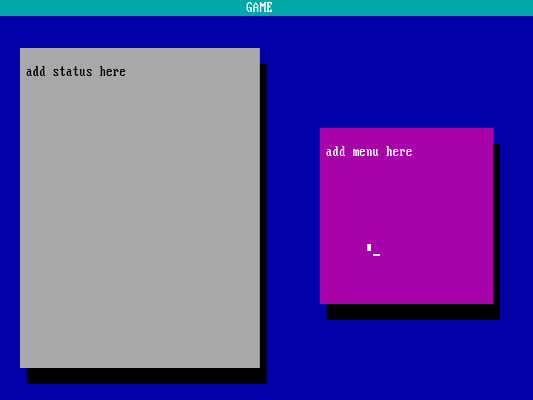
On Linux (or some other Unix-like operating system), start_screen and end_screen would instead use the curses or ncurses library to check that the terminal is large enough to play the game, and define some text windows. The status function would use a text window to show the sim’s stats, while menu would show a menu in a different text window and let the user select an action.
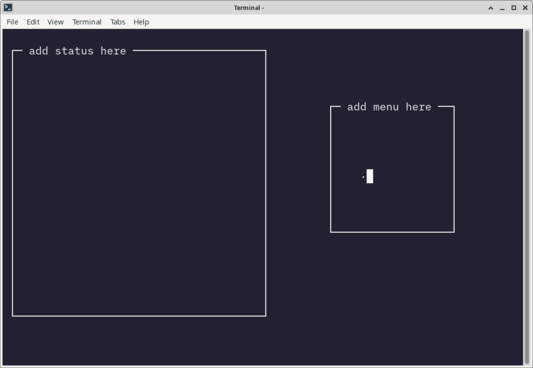
With a little extra creativity, you could write a different screen.c source file to support a graphical environment. I’ll leave that up to you.
Make it flexible
Not every Unix-like system is Linux. If you’re writing a Linux program today, it might run on something else tomorrow. So it’s important for open source developers to always keep an eye to how to write programs that will run on as many systems as possible.

 Don Watkins