Using ‘grep’ to play a word game
 Jim Hall
The Bash logo
Sometimes I need to take a break from what I’m doing and let my mind relax. And a fun way to do that is to play a simple puzzle game. You might be familiar with Wordle, the word puzzle game where you make successive attempts to guess a secret five-letter word that changes every day. For each guess, the game tells you which letters are correct and in the correct location (green), which letters are correct but in the wrong position (yellow), and which letters don’t actually appear in the secret word (gray).
I find that this can be a relaxing game to play when I need a quick break. And when I play the game, I like to use the grep command to exercise regular expressions. Using grep isn’t really cheating, it’s just a way to help narrow down my options.
Start with a list of words
To get started, you’ll need to have a list of five-letter words. Linux provides this in the /usr/share/dict/words file, but this file contains all kinds of words, including names and other proper nouns (like Linus), some number-based words (such as 12-point and 1st), and acronyms (like SPARC). Wordle doesn’t allow these kinds of words, it only uses all-lowercase words. To get a list of all-lowercase five-letter words, we can use the character pattern [a-z] which matches a single lowercase letter from a to z. If we use this multiple times, and combine it with ^ to match the start of a line, and $ for the end of a line, we’ll have a list of words that are all-lowercase and exactly five letters long:
$ grep '^[a-z][a-z][a-z][a-z][a-z]$' /usr/share/dict/words > wordlistThis looks for words in /usr/share/dict/words that are composed of exactly five lowercase letters, and saves the output in a new file called wordlist in the current directory. On my system, that list is over 15,000 words long!
$ wc -l wordlist
15034 wordlist
Narrow down the options
Start the game by guessing a word that has five letters. To help narrow down the options, I like to pick a word that has five unique letters, rather than a word with repeated letters, like boots. Some of the most commonly used letters in English include E, S, T, and R, so I’ll start by guessing the word stare.

Let’s use grep to help narrow down my possible next guesses. The gray and yellow letter tiles tell me that today’s secret word doesn’t contain the letters S, T, or A. The secret word does contain R and E, but not as the last two letters.
First, let’s narrow down the options to eliminate words that do not contain S, T, or A. The -v option for grep is very handy here to “invert” a search. For example, if we “invert” the search for any words with S, T, or, A, grep will return only the words that do not contain those letters. This already reduces our options from 15,000 possible words in the first guess to only 3,600 possible words for our second guess:
$ grep -v '[sta]' wordlist > guess2a
$ wc -l guess2a
3640 guess2a
But this list also includes words like chide, which has the letter E in the last position, or the word berry which has an R in the next-to-last position. Wordle colored those letter tiles yellow after our first guess, to indicate that the secret word had both R and E in it, but not in those positions. So to narrow down our possible list of guesses, we need to eliminate any words with an E as the last letter, or an R as the second-to-last letter. This brings the list down to only 550 possible words:
$ grep e guess2a | grep -v 'e$' | grep r | grep -v 'r.$' > guess2b
$ wc -l guess2b
553 guess2b
The period in r.$ is a placeholder for any possible character. In this case, since our list only contains words with five letters, this regular expression effectively means “the letter R as the next-to-last letter.”
Make another guess
As I look through my list of words to make my next guess, I want to pick an “everyday” word that has five unique letters. For example, the word creek is good, but it has two E’s. Instead, I decided to guess the word biker.
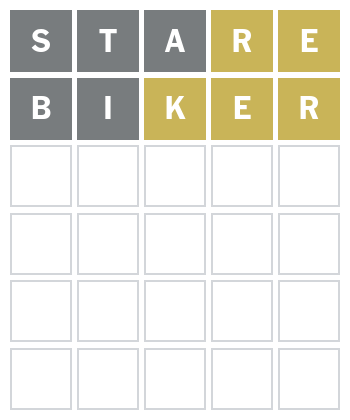
Guessing a word that has five unique letters provides me additional information about what letters might appear in the word. For example, the gray and yellow tiles tell me that the secret word does not contain the letters B or I. It does have a K in it, but not as the middle letter.
We can use grep again to further narrow down the options. As before, the first step is to eliminate any words that have B or I. This narrows the list to just over 300 possible words:
$ grep -v '[bi]' guess2b > guess3a
$ wc -l guess3a
325 guess3a
Then, filter the list to only find words with K, E, and R, but not as the last three letters. Since we already filtered the word list to only contain R and E words, we don’t need to run grep with those letters, but we need to grep for any words with K:
$ grep k guess3a | grep -v '^..k' | grep -v 'e.$' | grep -v 'r$' > guess3b
$ wc -l guess3b
9 guess3b
This brings the list down to only nine possible words:
$ cat guess3b
dreck
freck
jerky
kerch
kreng
perky
reeky
renky
wreck
Guess the word
From here, guessing the secret word within six total attempts should be pretty easy. Wordle tends to use “everyday” words, so we can pick a word like wreck for the next guess.
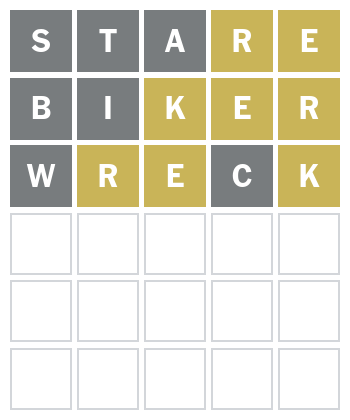
This is getting close! We now know the word doesn’t contain W or C, and the letters R, E, and K are in the wrong positions:
$ grep -v w guess3b | grep -v c | grep -v '^.r' | grep -v '^..e' | grep -v 'k$' > guess4a
$ wc -l guess4a
3 guess4a
This narrows down the list of possible words to just three:
$ cat guess4a
jerky
perky
renky
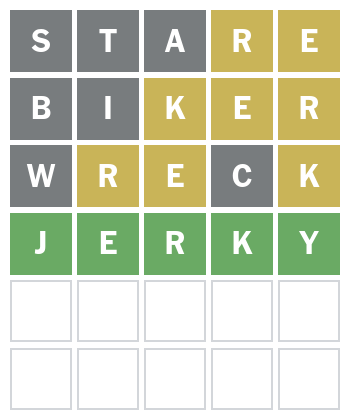
I’ll guess the word jerky, which happens to be correct!
Regular expressions for the win
The grep command is a powerful tool that lets you find words in a list based on regular expressions. This example shows how to use grep to help narrow down the options in a word puzzle game, but you can use grep in the same way to match other things. For example, system administrators might use grep to find errors in a log file, such as the /var/log/messages file, but only for a particular day. With grep, you can match text at the beginning of a line, the end of a line, or anywhere in between – or find lines that do not contain the text pattern. Add grep to your systems administrator “toolkit” to make your work easier.



 Don Watkins