Find invalid characters in FORTRAN 77 programs
 Jim Hall
Image by: Opensource.com CC-by-SA 4.0
My undergraduate degree was in physics, and at the time, every physics student at my university had know how to write FORTRAN 77 programs. Not every lab could be analyzed by a spreadsheet or with a linear regression; sometimes, you needed to write your own data analysis program. In a few upper-level labs, we had to simulate a complex equation of motion and perform numerical analysis with a FORTRAN 77 program.
The FORTRAN programming language has advanced considerably since then, although I admit I haven’t followed its evolution since then. I know that the language changed in 1990 with Fortran 90 (which also changed the capitalization of the name). Fortran 90 and later versions eliminated the column-limited nature of old-style FORTRAN.
But old-style FORTRAN has enjoyed a certain popularity as more people discover retro-computing, and specifically retro-programming with FORTRAN 77. For example, you can compile FORTRAN 77 programs using the GNU gfortran compiler, which is part of the GNU Compiler Collection (GCC). Or you can boot into FreeDOS and install the Open Watcom FORTRAN 77 from the Bonus CD.
Allowed characters
Old-style FORTRAN was created at a time when computers read programs from punched cards. This added a limitation to how you could write programs: Each card was 80 columns, although columns 73 to 80 were reserved for card-sorting machines. The other columns had specific meaning: C or * in column 1 was a comment, numbers in columns 1 to 5 were line labels, a character in column 6 continued from the previous line, and columns 7 to 72 were for program statements.
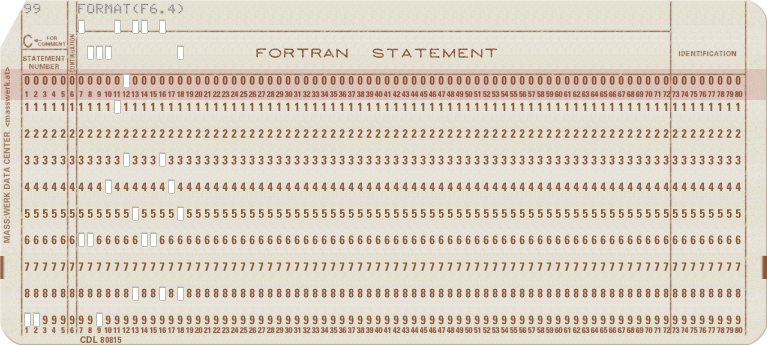
As a FORTRAN 77 programmer, I got pretty good at tapping out 6 spaces when starting a new program line. But in an earlier article, I wrote about how to expand tabs in a FORTRAN 77 program so you could type a tab instead, and let a program convert the tab to the right number of spaces for you.
Another limitation was that punched cards could only represent a limited set of characters. The FORTRAN 77 specification (ANSI X3.9-1978) specifies the allowed characters as: space, the uppercase letters A to Z, the numbers 0 to 9, the math symbols = + - * / ( ), and the punctuation symbols dollar ($) quote (') colon (:) comma (,) and period (.).
Lowercase to uppercase
But typing in all-uppercase is tiring to look at. As a university student who was also learning C programming at the time, I preferred typing my programs in all-lowercase.
Converting to uppercase is very easy with the Unix tr command. In the standard usage, tr takes two character sets: the range of characters to convert from, and the range to convert to. For example, to convert lowercase to uppercase, you can use tr this way:
$ tr a-z A-ZLet’s see that in action by using the echo command to print a short message that tr will convert to uppercase:
$ echo Fortran | tr a-z A-Z
FORTRAN
Converting from lowercase to uppercase with tr was a handy feature, especially when combined with the untab77 program from the earlier article. I could write FORTRAN 77 programs in all-lowercase, using leading tabs, and let the computer convert my source code to an acceptable format that the compiler would recognize. In a typical example, I might write my program under one filename, then use the untab77 and tr programs to convert the text and save it under a new filename, which I would then compile.
Of course, Linux didn’t have a FORTRAN 77 compiler when I was an undergraduate student in the early 1990s, so I instead used the f2c program. This converted FORTRAN 77 into C, which could be compiled and linked with the f2c library:
$ untab77 < analyze.f | tr a-z A-Z > t.f
$ f2c t.f
t.f:
   MAIN loop:
$ gcc -o analyze t.c -lf2c -lm
Finding invalid characters
FORTRAN had a limited character set of letters, numbers, spaces, and certain math and punctuation characters. While some FORTRAN compilers allowed other characters for special purposes, these were only extensions to the language and not guaranteed to be supported everywhere. For example, FORTRAN 77 on the VAX used exclamation (!) to provide an inline comment after a program statement. This was a popular extension, but not every FORTRAN 77 compiler recognized this.
I only wanted to write valid and portable FORTRAN 77 programs, so I created a program that would warn me if my source code contained characters not recognized by the ANSI X3.9-1978 standard. Since this program evaluated input one character at a time, I extended the program to convert lowercase to uppercase at the same time, saving me the extra step to use tr to do that.
To write this program, we first need to write a function that recognizes if a character is part of the ANSI X3.9-1978 allowed character set. This function evaluates a single character (c) to see if it is an uppercase letter, a number, or one of the allowed math or punctuation symbols:
int charset77(int c)
{
    /* is this character part of the F77 char set? */

    /* see 3-1 in ANSI X3.9-1978 */
    /* A-Z 0-9 space = + - * / ( ) , . $ ' : */

    /* A-Z */
    if ((c >= 'A') && (c <= 'Z')) { return 1; }

    /* 0-9 */
    if ((c >= '0') && (c <= '9')) { return 1; }

    /* ' ( ) * + , - . / */
    if ((c >= '\'') && (c <= '/')) { return 1; }

    /* space = $ : */
    if ((c == ' ') || (c == '=') || (c == '$') || (c == ':')) { return 1; }

    /* certain other control chars are allowed too: */

    if (c == '\n') { return 1; }

    return 0;
}
The function takes a “step-wise” approach, and evaluates the input character against the ranges of allowed characters in separate “passes.” If the character is an uppercase letter, the function returns 1 to indicate a true value. And the same if the character is a number or one of the other allowed math and punctuation characters.
At the end, if it could not match one of the allowed characters, the function returns 0 to indicate a false value. These days, you might write the C program to include <stdbool.h> and return a true or false value, but C programming in the early 1990s didn’t have these standard Boolean values; using zero for false and any other value for true was typical.
With this function, we can now write our main program that converts input characters from lowercase to uppercase, and detects invalid characters at the same time. This program is a very simple one, and only reads from standard input (using getchar) and prints to standard output (using putchar). Error messages are printed on standard error, so warnings will not be saved if you use shell redirection (like >) to send the output to a file.
int main()
{
    int c;

    /* uppercase everything */

    while ((c = getchar()) != EOF) {
        if (islower(c)) {
            putchar(toupper(c));
        }
        else {
            putchar(c);

            if (!charset77(c)) {
                fprintf(stderr, "'%c' invalid character\n", c);
            }
        }
    }

    return 0;
}
If the character is a lowercase letter (the islower function can test this very easily) the function simply prints it as an uppercase letter (using the toupper standard C library function). Otherwise, the function prints the character, and evaluates if it is part of the allowed FORTRAN 77 character set (using the charset77 function, from above).
Let’s put it all together into a single C program file, called upper77.c:
#include <stdio.h>
#include <ctype.h>

int charset77(int c)
{
    /* is this character part of the F77 char set? */

    /* see 3-1 in ANSI X3.9-1978 */
    /* A-Z 0-9 space = + - * / ( ) , . $ ' : */

    /* A-Z */
    if ((c >= 'A') && (c <= 'Z')) {
        return 1;
    }

    /* 0-9 */
    if ((c >= '0') && (c <= '9')) {
        return 1;
    }

    /* ' ( ) * + , - . / */
    if ((c >= '\'') && (c <= '/')) {
        return 1;
    }

    /* space = $ : */
    if ((c == ' ') || (c == '=') || (c == '$') || (c == ':')) {
        return 1;
    }

    /* certain other control chars are allowed too: */

    if (c == '\n') {
        return 1;
    }

    return 0;
}

int main()
{
    int c;

    /* uppercase everything */

    while ((c = getchar()) != EOF) {
        if (islower(c)) {
            putchar(toupper(c));
        }
        else {
            putchar(c);

            if (!charset77(c)) {
                fprintf(stderr, "'%c' invalid character\n", c);
            }
        }
    }

    return 0;
}
You can compile the program using the GNU C Compiler:
$ gcc -o upper77 upper77.cFind invalid characters
Let’s see this program in action by testing it with a simple FORTRAN 77 program that prints the numbers from 1 to 10, plus the square of that value (1^2 = 1, 2^2 = 4, and so on). I’ve written this in all-lowercase, using tabs, like I might have done in the 1990s. Note that we can always expand the tabs using the untab77 program from the other article, and convert from lowercase to uppercase using the new upper77 program:
$ cat --show-tabs square.f
c print the numbers 1 to 10, and its square value (n^2)
^Iprogram square
^Iinteger n
^Ido 10 n=1,10,1
10^Iprint *,n,n**2
^Iend

$ untab77 < square.f
c print the numbers 1 to 10, and its square value (n^2)
      program square
      integer n
      do 10 n=1,10,1
10    print *,n,n**2
      end
Now we can use the upper77 program to convert this to uppercase, and use shell redirection (with >) to save the output to a new file. Because the caret (^) is not part of the FORTRAN 77 allowed character set, upper77 will also print a warning. Fortunately, this is part of a comment, and will be ignored anyway.
$ untab77 < square.f | upper77 > t.f
'^' invalid character

$ cat t.f
C PRINT THE NUMBERS 1 TO 10, AND ITS SQUARE VALUE (N^2)
      PROGRAM SQUARE
      INTEGER N
      DO 10 N=1,10,1
10    PRINT *,N,N**2
      END
Finally, we can compile the program with the FORTRAN 77 compiler. Let’s do it like the early 1990s, using the f2c utility to convert from FORTRAN to C, then compiling that C program using the GNU C Compiler:
$ f2c t.f
t.f:
   MAIN square:
$ gcc -o square t.c -lf2c -lm
The result is a valid program that prints the values from 1 to 10, plus the square of each value: 1 to 100.
$ ./square
 1 1
 2 4
 3 9
 4 16
 5 25
 6 36
 7 49
 8 64
 9 81
 10 100
Writing these little tools made the command line more useful to me. With a few command line tools, I could write FORTRAN 77 programs the way that felt more natural to me (using lowercase and tabs) and convert them to the proper format when I compiled the program. Being able to create your own tools is a powerful feature of open source operating systems. You don’t need to be an expert programmer, you just need to know enough that you can create tools that let you work the way you want to.