 Jim Hall
When I was an undergraduate physics student, everyone in my program had to learn how to write programs in FORTRAN 77. While Fortran 90 (with the new capitalization) had been standardized just a year or two before, new Fortran 90 compilers were still very expensive, so we used FORTRAN 77 to write data analysis programs.
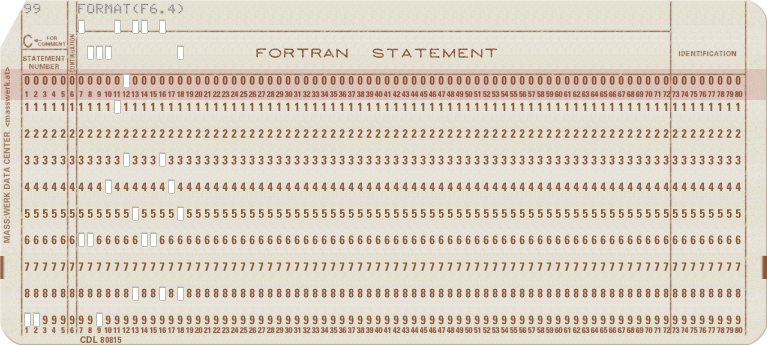
Old-style FORTRAN uses a particular column-oriented format. This dates back to the original FORTRAN, which was written on punched cards that stored only 80 columns of data. To make the most of this format, FORTRAN applied a strict column rule:
Cor*in the first column was a comment line- Columns 1 to 5 were reserved for line labels
- Column 6 indicated a continuation from the previous card
- Columns 7 to 72 contained program statements
- Columns 73 to 80 were ignored; these were used for card sorting machines to put things back into order if you mixed up the stack of cards
Programming in modern editors
By the time I learned FORTRAN 77, no one used punched cards anymore. Instead, we used a plain text editor. But we still needed to keep track of the columns, so we got very good at tapping out six spaces before typing a new program line.
If you were lazy like me, you looked for a shortcut. I realized that six spaces was very close to a tab stop, which was every eight columns. In fact, many FORTRAN compilers at that time would replace an initial tab with eight spaces. But using a tab instead of spaces meant you were losing two spaces on a program line. That might not be a big deal for most program statements, but for a program that included very involved calculations, losing two spaces might mean continuing a statement to another line.
I solved this problem for myself by writing a little program that would expand tabs to spaces. But for my FORTRAN programs, I needed a slight variation: Assume any tab in columns 1 to 6 jumps ahead to column 7, otherwise just add a space.
Writing a program like this is not very difficult in the C programming language. The program starts by counting columns. If it reads a tab as one of the first seven characters on a line, it adds spaces until it reaches column 7. After that, any tab is replaced by a single space.
Because valid FORTRAN program lines should never be longer than 72 columns, the program stops tracking columns at that point. This means the program can use a short variable type to count the columns, since it only needs to count up to 72.
#include <stdio.h>

int main()
{
    short col = 1;
    int c;

    while ((c = getchar()) != EOF) {
        if (c == '\t') {                                   /* tab */
            if (col < 7) {
                while (col < 7) {
                    putchar(' ');
                    col++;
                }
            }
            else {
                putchar(' ');
                if (col < 73)
                    col++;
            }
        }
        else {                                             /* not a tab */
            putchar(c);
            if (col < 73)
                col++;
            if (c == '\n') {
                col = 1;
            }
        }
    }

    return 0;
}
Let’s save this program as untab77.c and compile it:
$ gcc -o untab77 untab77.cWe can test the program by writing a short FORTRAN 77 source file that uses tabs. This FORTRAN program called ten.f prints the numbers from one to ten. I’ve used tabs on most lines, and included a comment line that provides a sort of “ruler” for columns, up to column 80. We can use the Linux expand program to expand the tabs to spaces, but it’s important to know where the tabs are so I’ve also used cat with an option to show the tabs:
$ expand ten.f
C2345678901234567890123456789012345678901234567890123456789012345678901234567890
        PROGRAM LOOP
        INTEGER I
      DO        10      I       =       1,      10,     1
 10     PRINT *,I
        END
$ cat --show-tabs ten.f
C2345678901234567890123456789012345678901234567890123456789012345678901234567890
^IPROGRAM LOOP
^IINTEGER I
      DO^I10^II^I=^I1,^I10,^I1
 10^IPRINT *,I
^IEND
The untab77 program correctly replaces any tabs in the first seven columns with spaces, and any tabs after that with just a single space. This provides a good balance that keeps the program readable:
$ ./untab77 < ten.f
C2345678901234567890123456789012345678901234567890123456789012345678901234567890
      PROGRAM LOOP
      INTEGER I
      DO 10 I = 1, 10, 1
 10   PRINT *,I
      END
An improved program
One risk when writing FORTRAN programs is that a line might exceed 72 columns. Remember, columns 73 to 80 were ignored, and were reserved for card sorting machines. Since the program is already counting columns, we can easily add a few lines to detect if a program line goes beyond column 72, and print a warning if it does. Here’s an improved version that also reports when text exceeds column 72:
#include <stdio.h>
#include <ctype.h>

int main()
{
    short col = 1;
    int c;
    size_t line = 1;

    while ((c = getchar()) != EOF) {
        if (c == '\t') {                                   /* tab */
            if (col < 7) {
                while (col < 7) {
                    putchar(' ');
                    col++;
                }
            }
            else {
                putchar(' ');
                if (col < 73)
                    col++;
            }
        }
        else {                                             /* not a tab */
            if ((col == 73) && (!isspace(c))) {
                fprintf(stderr, "line %zd: extra text beyond column 72\n", line);
                col = 80;
            }

            putchar(c);
            if (col < 73)
                col++;
            if (c == '\n') {
                line++;
                col = 1;
            }
        }
    }

    return 0;
}
If we compile the updated program and run it against the ten.f test file, we should see it complain about the first line. This line is a comment, so it will be ignored by the compiler anyway, but it’s a good test to see how the program can alert you if your FORTRAN lines get too long:
$ gcc -o untab77 untab77.c
$ ./untab77 < ten.f
line 1: extra text beyond column 72
C2345678901234567890123456789012345678901234567890123456789012345678901234567890
      PROGRAM LOOP
      INTEGER I
      DO 10 I = 1, 10, 1
 10   PRINT *,I
      END
Because the error message is printed using stderr, it will only get printed to the user’s terminal. This is important if you use the program as a filter, so you can save the output to a new file. You’ll still see the error message, so you know to check line 1 of the source file in case you need to fix it:
$ ./untab77 < ten.f > 10.f
line 1: extra text beyond column 72
Writing your own tools
Being able to create your own tools is a powerful feature of open source systems like Linux. You don’t need to be an expert programmer, you just need to know enough that you can create tools that are useful to you and the work you need to do.


 Don Watkins