Trade-offs in programming
 Jim Hall
If you look closely at a program’s source code, you’ll see more than just lines of code. You’ll also find interesting decisions as trade-offs to balance code readability and system performance.
Most programmers make these kinds of decisions, although they may not always be conscious decisions. Some are so ingrained by practice that they aren’t really decisions but habits.
A recent example
You can find one trade-off example in my FORTRAN 77 code to display the Mandelbrot Set. In brief, you calculate the Mandelbrot Set by iterating the function z = z2 + c for different values of the complex number c, always starting the first calculation with z = 0. If z remains stable, then you draw a black pixel for that c value. Otherwise, you draw a colored pixel.
In mathematics, it’s well-known that if the absolute value of z exceeds 2, the iteration of z = z2 + c will never become stable. However, my code sample to calculate the Mandelbrot Set did not directly reference “2” and did not use the ABS function to calculate the absolute value. Instead, my sample program used this calculation:
10    Z=Z**2+C

      DIST=REAL(Z)**2 + IMAG(Z)**2
      COUNT=COUNT+1
      IF ((DIST.LT.4.0).AND.(COUNT.LT.LIMIT)) GOTO 10
Why did I choose to write a different method to calculate the absolute value? This was a programming trade-off that I learned long ago, and persists in my FORTRAN programs today.
Absolute value
First, let’s consider what the absolute value of a number really means. If you think about the absolute value of an ordinary number like -1, you probably think “just make it positive.” And that’s technically correct, as far as ordinary numbers are concerned.
Another way to think about the absolute value of a number is its “distance” from zero. That is, -1 is “1” away from zero. Similarly, 3 is “3” away from zero, and -4 is “4” away from zero.
Now apply that to complex numbers. A complex number is a two-part value: a real part and an imaginary part. You can think of this as a coordinate on an x,y chart; the real part is on the x axis, and the imaginary part is on the y axis. The absolute value of a complex number is a straight line from that x,y coordinate to zero.
You can calculate the absolute value of a complex number using the Pythagorean theorem, which you probably learned in grade school. For any right triangle with sides of length a and b, you can calculate the length of the hypotenuse as a2 + b2 = c2:
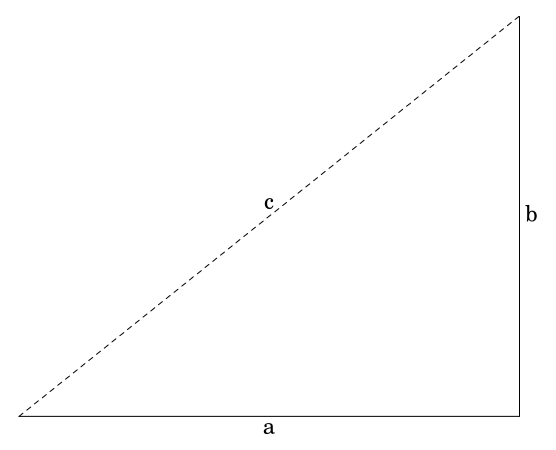
If a is the real part and b is the imaginary part, then you can calculate the hypotenuse as c. This is the absolute value of a complex number, the “distance” from zero.
Taking a shortcut
I learned FORTRAN 77 programming in the early 1990s. Computers were measured in speeds of megahertz (MHz) and a typical “fast” computer at the time was the 80486DX (1991) which clocked in at 50 MHz. I had a slower 80386 CPU, which ran at about 33 MHz. By comparison, an “average” PC in 2026 has a 6-core CPU that runs at about 4.7 GHz. That’s roughly 4,700 MHz compared to my 33 MHz (about 140x faster) but with 6 cores instead of just one.
My university ran a MicroVAX system at the time. I’m making a guess (I don’t know for sure) but that might have been a VAX 4000 from 1990, which ran at about 35.71 MHz—roughly comparable to my home computer at the time.
With a slower CPU, I learned to avoid unnecessary calculations. To determine the absolute value of a complex number, a program actually needed to process four calculations:
- The square of the real value: a2
- The square of the imaginary value: b2
- The sum of the squares: a2 + b2
- The square root of the sum: c
Calculating the square of a number doesn’t take a lot of computer time; neither does adding two values. However, calculating the square root can be slow if the CPU is not fast. This will become more noticeable as you perform the same calculation over and over again, such as to iterate the function z = z2 + c.
So I made a shortcut: if the absolute value of z remains less than 2, then that’s the same as a2 + b2 less than 4. That’s the calculation in the Mandelbrot Set program:
10    Z=Z**2+C

      DIST=REAL(Z)**2 + IMAG(Z)**2
      COUNT=COUNT+1
      IF ((DIST.LT.4.0).AND.(COUNT.LT.LIMIT)) GOTO 10
Trade-offs in programming
These days, faster CPUs mean the calculation is not noticeably slower if you replace the DIST calculation with the standard ABS function. This would be more readable for modern audiences:
10    Z=Z**2+C

      COUNT=COUNT+1
      IF ((ABS(Z).LT.2.0).AND.(COUNT.LT.LIMIT)) GOTO 10