Skip to content

Both.org

News, Opinion, Tutorials, and Community for Linux Users and SysAdmins

Primary Menu
  • About Us
  • Computers 101
    • Hardware 101
    • Operating Systems 101
  • End of 10 Events
    • Wake Forest, NC, — 2025-09-20
  • Linux
    • Why I use Linux
    • The real reason we use Linux
  • My Linux Books
    • systemd for Linux SysAdmins
    • Using and Administering Linux – Zero to SysAdmin: 2nd Edition
    • The Linux Philosophy for SysAdmins
    • Linux for Small Business Owners
    • Errata
      • Errata for The Linux Philosophy for SysAdmins
      • Errata for Using and Administering Linux — 1st Edition
      • Errata for Using and Administering Linux — 2nd Edition
  • Open Source Resources
    • What is Open Source?
    • What is Linux?
    • What is Open Source Software?
    • The Open Source Way
  • Write for us
    • Submission and Style guide
    • Advertising statement
  • Downloads
  • Home
  • Chart Your Course: Essential Open Source Software for Boat Owners
  • Linux
  • Open Source Software

Chart Your Course: Essential Open Source Software for Boat Owners

Whether you're sailing down a local river or setting out on the open seas, keep track of your nautical location with OpenCPN.
Don Watkins February 17, 2024 3 minutes read
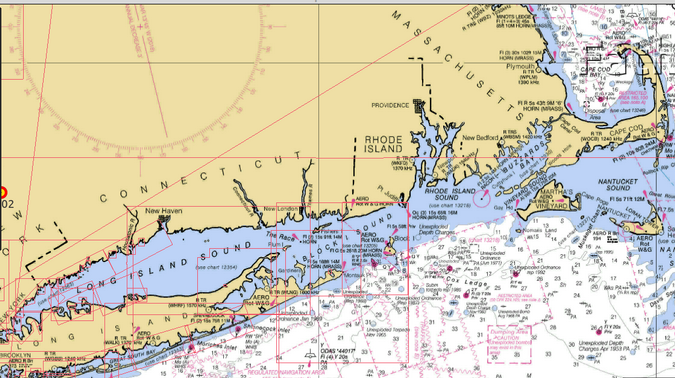
Boating Navigation Map of Long Island Sound.

OpenCPN Navigation Map of Long Island Sound.

Last Updated on July 1, 2024 by David Both

Whether you’re sailing down a local river or setting out on the open seas, keep track of your nautical location with OpenCPN.

If you’re traveling by boat down your local waterway or sailing around the world, you can bring great navigation software and maintain your commitment to open-source software. OpenCPN is free and open-source software developed by sailors. It is the primary navigation interface for vessels with full-time helm-visible navigational suites. The software is written in C and released under a GPLv2 license.

Install OpenCPN

OpenCPN can be installed on Linux, macOS, or Windows. Packages are available for many distros and Flatpack from the OpenCPN download page. I installed OpenCPN on my Linux laptop using Flatpack. For macOS and Windows, you can download and install packages from the OpenCPN website. There’s also an Android app version available from the Google Play store.

Use OpenCPN

Once it’s installed, launch OpenCPN to try it out. The main menu bar is located on the left.

The first choice from the top is Options. Here, you can select how the program appears in the display and what units of measurement of speed, distance, and depth to use. You also can set how latitude and longitude are displayed in decimal degrees.
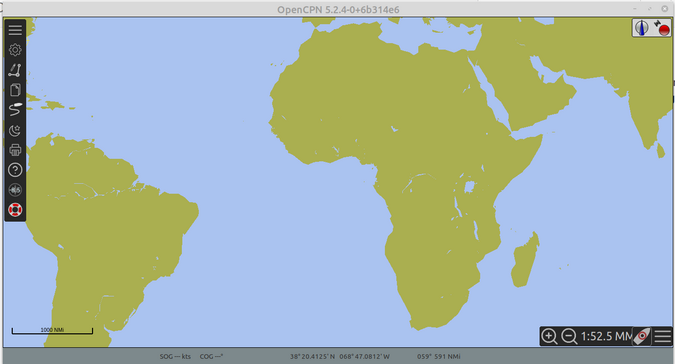
OpenCPN map showing latitude and longitude measurements

Get charts

OpenCPN doesn’t come pre-installed with charts. Which charts you choose to install are generally determined by your location and, potentially, your destination. Many free charts are available, including those from the US NOAA Office of Coast Survey, Marinha Do Brasil (which includes parts of Antarctica), East Asia Hydrographic Commission, many sources of inland European waterway charts, and many others. The chart page also links to commercial sources, should you require them.

Learn more

The project provides an excellent quickstart guide to make it easy for new users.

The OpenCPN project also has excellent documentation to guide you through the installation and setup process. It provides step-by-step directions for first use and installing charts. The program also comes with a list of supplementary software you can use with it.

OpenCPN is available in 20 languages. There are lots of how-to videos available on Vimeo and YouTube to help you become familiar with the software.
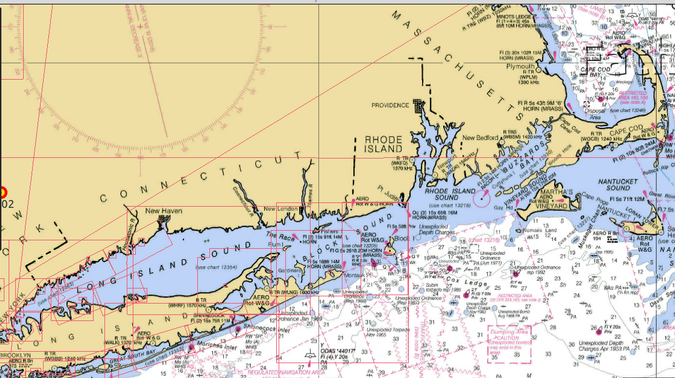
OpenCPN map of Long Island and Nantucket Sounds
OpenCPN navigation map of Long Island Sound.

Get involved

David S. Register is the lead developer for the project. He originally developed OpenCPN in 2009 for his own use. Other folks expressed an interest in his software, and now there are thousands of users and more than 40 active developers worldwide.

You can get involved with the project by consulting its excellent developer documentation.

Tags: Boating Navigation Recreation

Post navigation

Previous: systemd — #6: Control your computer time and date with systemd
Next: systemd — #7: Use systemd timers instead of cronjobs

Related Stories

A Black femail working on a computer in an office.
  • Linux
  • Moving to Linux
  • Open Source
  • Opinion

Why choose Linux?

Don Watkins April 10, 2026
Library with books
  • Books
  • Linux
  • News
  • Using and Administering Linux: Zero to SysAdmin

Book Update

David Both April 4, 2026
The Fedora Logo in blue.
  • Fedora
  • Linux
  • Moving to Linux

Fedora Prix Fixe Menu Gives Flexibility

David Both April 2, 2026

Random Quote

Unix is user-friendly. It just isn’t promiscuous about which users it’s friendly with.

— Steven King

Why I’ve Never Used Windows

On February 12 I gave a presentation at the Triangle Linux Users Group (TriLUG) about why I use Linux and why I’ve never used Windows.

Here’s the link to the video: https://www.youtube.com/live/uCK_haOXPFM 

David Both ATO Interview

Last October at All Things Open (ATO) I was interviewed by Jason Hibbits of We Love Open Source. It’s posted in the article “Why today’s AI isn’t intelligent (yet)“.

Technically We Write — Our Partner Site

Our partner site, Technically We Write, has published a number of articles from several contributors to Both.org. Check them out.

Technically We Write is a community of technical writers, technical editors, copyeditors, web content writers, and all other roles in technical communication.

Subscribe to Both.org

To comment on articles, you must have an account.

Send your desired user ID, first and last name, and an email address for login (this must be the same email address used to register) to subscribe@both.org with “Subscribe” as the subject line.

You’ll receive a confirmation of your subscription with your initial password as soon as we are able to process it.

Administration

  • Log in
  • Entries feed
  • Comments feed
  • WordPress.org

License and AI Statements

Both.org aims to publish everything under a Creative Commons Attribution ShareAlike license. Some items may be published under a different license. You are responsible to verify permissions before reusing content from this website.

The opinions expressed are those of the individual authors, not Both.org.

You may not use this content to train AI.


Advertising Statement

Both.org does not sell advertising on this website.


Advertising may keep most websites running—but at Both.org, we’re committed to keeping our corner of the web ad-free. Both.org does not sell advertising on the website. Nor do we offer sponsored articles at this time. We’ll update this page if our position on sponsorships changes.

We want to be open about how the website is funded. Both.org is supported entirely by David Both and a few other dedicated individuals.


Copyright © All rights reserved. | MoreNews by AF themes.