Skip to content

Both.org

News, Opinion, Tutorials, and Community for Linux Users and SysAdmins

Primary Menu
  • About Us
  • Computers 101
    • Hardware 101
    • Operating Systems 101
  • End of 10 Events
    • Wake Forest, NC, — 2025-09-20
  • Linux
    • Why I use Linux
    • The real reason we use Linux
  • My Linux Books
    • systemd for Linux SysAdmins
    • Using and Administering Linux – Zero to SysAdmin: 2nd Edition
    • The Linux Philosophy for SysAdmins
    • Linux for Small Business Owners
    • Errata
      • Errata for The Linux Philosophy for SysAdmins
      • Errata for Using and Administering Linux — 1st Edition
      • Errata for Using and Administering Linux — 2nd Edition
  • Open Source Resources
    • What is Open Source?
    • What is Linux?
    • What is Open Source Software?
    • The Open Source Way
  • Write for us
    • Submission and Style guide
    • Advertising statement
  • Downloads
  • Home
  • How I fixed Random Reboots on One of My Laptops
  • Hardware
  • Problem Solving
  • Right to Repair

How I fixed Random Reboots on One of My Laptops

David Both May 28, 2024 4 minutes read
wfh_work_home_laptop_work
1

Last Updated on June 8, 2024 by David Both

I have three laptops that I’ve purchased from System76 out of Denver Colorado. They design and build exceptional laptops and install Pop!_OS, their own mix of Ubuntu Linux on them. I’ve been very happy with these laptops, especially because they are designed to be repairable.

The Problem

I purchased the oldest of these three laptops, an Oryx Pro6, in 2018 so it’s about 7 years old. I replaced a keyboard on it about 4 years ago and that was easy with the directions supplied by System76. I recently needed to replace the keyboard again as a couple of the keys stopped working. I don’t really consider this as a System76 problem because the keyboards are manufactured by a an Chinese company and are used in many different laptops from many vendors; I also tend to bang on the keys as I’m not a touch-typist.

A few weeks ago I began having more problems with the keyboard when some keys would not work. Shortly before I replaced the keyboard the second time, the laptop began to exhibit random reboots. This didn’t normally interfere with my work, which I normally perform on my main workstation which is a desktop. But I did want to use this laptop for a presentation at a STEM conference for students in middle school through high school. I decided to fix the keyboard first as it impaired my ability to do problem determination of the random reboots.

I ordered a new keyboard from Amazon and installed it. Rather I tried to install it. It wasn’t that the steps were hard but that the keyboard buckled a bit when I tried to snap it back into position.

The Solution

Upon further inspection, I discovered that the battery was swollen and pressing on some of the other components which, in turn, incurred into the space required for the keyboard. So I ordered a replacement battery.

Lithium-Ion batteries are supposed to be flat and swelling is a bad and dangerous thing. Figure 1 shows the old and new batteries. The swelling of the old battery is obvious. The impressions of other components on the swollen battery are also visible on the left cell of that battery. Batteries like this can cause fires or they can even explode.
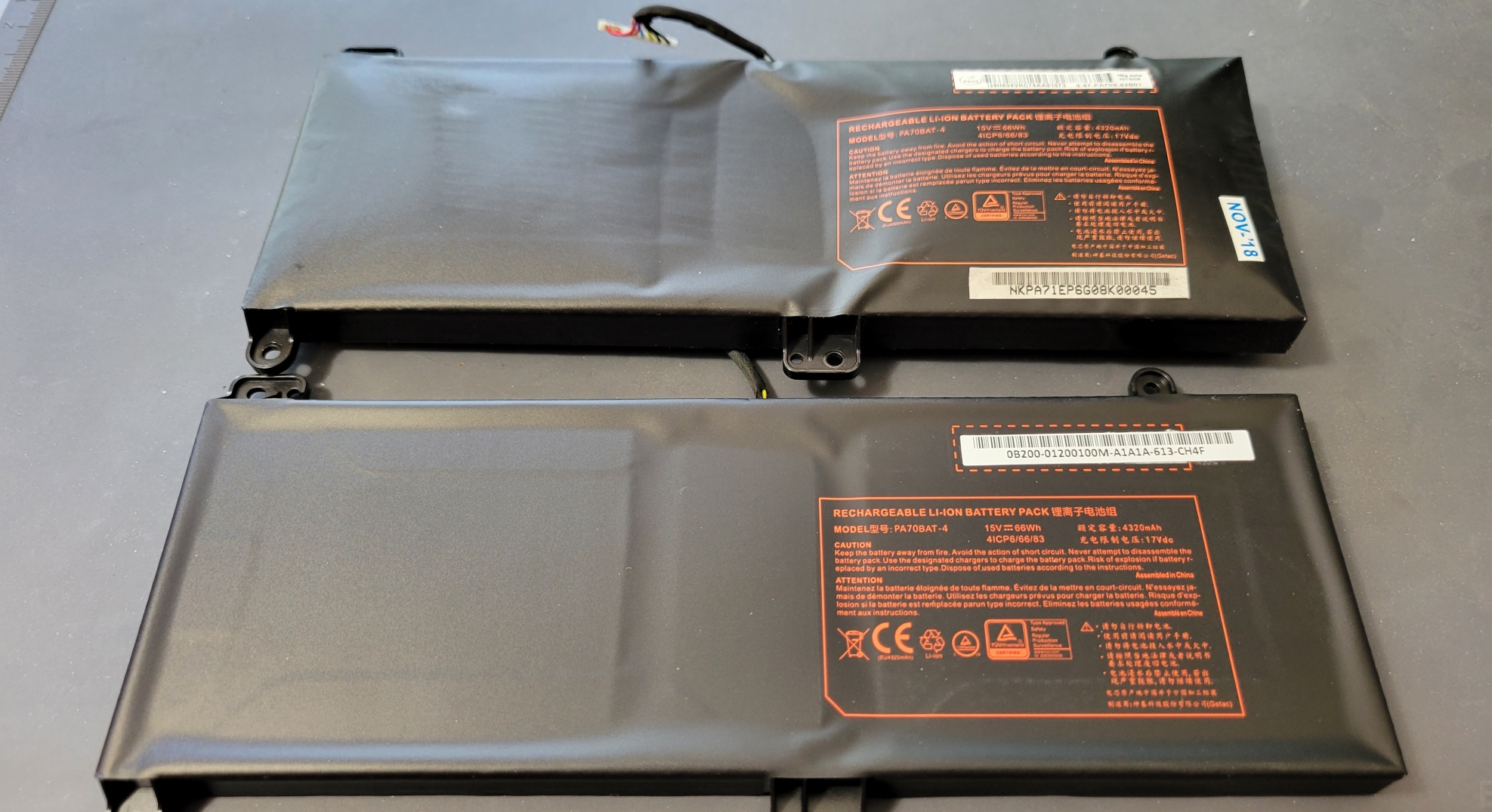
Figure 1: The swollen battery is obvious. The impressions of other components on the swollen battery are also visible on the left cell of that battery. Click to see the full-size image.

After replacing the battery, the keyboard fit as it should and snapped right into place.

The Surprise

After testing the keyboard for 20 minutes or so, I turned to other tasks, leaving the system running. I wanted it to reboot again so I could check the logs and journals to see if there were any hints there. There hadn’t been any previous suspicious entries but I was still hopeful.

So I waited for the next random reboot. And waited…and waited, and I’m still waiting after several weeks.

Replacing the battery fixed four things. Obviously it fixed the swollen battery problem. That, in turn, made space for the other components to return to their normal locations. And that allowed the keyboard to install correctly.

Lastly, this fixed the rebooting problem. I’m still not sure what the specific trigger was for those random reboots. Regardless, replacing a dangerously swollen battery resolved multiple, seemingly unrelated problems in addition to a safety issue.

A Final Word

Regardless of the side effects, whether there are any or not, a swollen battery should be replaced as soon as it’s discovered. Failure to replace and properly dispose of a swollen battery can result in explosion or fire. Batteries should also be discarded at a location that can safely dispose of it. My local Batteries+ Bulbs can do this. We also have a hazardous materials recycling center close to me which is where I take all of my old batteries.

Resources

PC Magazine, Chance Townsend & Jason Cohen Updated December 5, 2023: Help, My Laptop Battery Is Swollen! Now What?

Post navigation

Previous: Managing devices in Linux
Next: Problem solving strategies for SysAdmins

Related Stories

programming_keyboard_coding
  • Fedora
  • Getting Started
  • Linux
  • Problem Solving
  • VirtualBox

VirtualBox Problem Solved

David Both March 16, 2026
Intrepid-Crashed
  • Hardware
  • Linux
  • My Oldest Computer

Update on my Oldest Computer

David Both January 27, 2026
wfh_work_home_laptop_work
  • Hardware
  • Linux 101

Buying a Linux laptop that will last

Jim Hall January 6, 2026

Random Quote

Any system which depends upon human reliability is unreliable.

— Gilb’s laws of unreliability

Why I’ve Never Used Windows

On February 12 I gave a presentation at the Triangle Linux Users Group (TriLUG) about why I use Linux and why I’ve never used Windows.

Here’s the link to the video: https://www.youtube.com/live/uCK_haOXPFM 

David Both ATO Interview

Last October at All Things Open (ATO) I was interviewed by Jason Hibbits of We Love Open Source. It’s posted in the article “Why today’s AI isn’t intelligent (yet)“.

Technically We Write — Our Partner Site

Our partner site, Technically We Write, has published a number of articles from several contributors to Both.org. Check them out.

Technically We Write is a community of technical writers, technical editors, copyeditors, web content writers, and all other roles in technical communication.

Subscribe to Both.org

To comment on articles, you must have an account.

Send your desired user ID, first and last name, and an email address for login (this must be the same email address used to register) to subscribe@both.org with “Subscribe” as the subject line.

You’ll receive a confirmation of your subscription with your initial password as soon as we are able to process it.

Administration

  • Log in
  • Entries feed
  • Comments feed
  • WordPress.org

License and AI Statements

Both.org aims to publish everything under a Creative Commons Attribution ShareAlike license. Some items may be published under a different license. You are responsible to verify permissions before reusing content from this website.

The opinions expressed are those of the individual authors, not Both.org.

You may not use this content to train AI.


Advertising Statement

Both.org does not sell advertising on this website.


Advertising may keep most websites running—but at Both.org, we’re committed to keeping our corner of the web ad-free. Both.org does not sell advertising on the website. Nor do we offer sponsored articles at this time. We’ll update this page if our position on sponsorships changes.

We want to be open about how the website is funded. Both.org is supported entirely by David Both and a few other dedicated individuals.


Copyright © All rights reserved. | MoreNews by AF themes.