Jim Hall
When I was a physics undergraduate in the early 1990s, FORTRAN 77 was the standard programming language for scientific computing. The Fortran 90 specification had just been published, but new compilers that supported the new standard were quite expensive, so FORTRAN 77 was what we learned. Every physics student at my university was required to learn FORTRAN 77 programming so we could write our own programs to help analyze lab data, such as numerical solutions to certain lab problems (like a circular pendulum under friction) that couldn’t otherwise be solved in a spreadsheet.
By the time I graduated in the mid 1990s, I had picked up a few other programming languages, such as C for systems programming. Since I didn’t go into a “lab” career, I assumed I would never write another FORTRAN 77 program.
But what’s old is new again. A few years ago, I started seeing more posts from people who were curious to learn this “antique” programming language. And to be fair, FORTRAN 77 is quite old; each “iteration” of the language since FORTRAN 66 indicates the year the standard was adopted: FORTRAN 66 in 1966, FORTRAN 77 in 1977, Fortran 90 (with a new capitalization) in 1990, then Fortran 95, Fortran 2003, Fortran 2008, Fortran 2018, and Fortran 2023. I don’t know any of these more recent versions of Fortran, but I still remember a few things about FORTRAN 77 programming. If you’re interested in learning FORTRAN 77, here a few things to know:
1. Programs are column sensitive
Original FORTRAN programs were loaded into a computer using a stack of punched cards. These cards stored only 80 columns of text, which isn’t a lot. To get the most out of each “line” on a card, FORTRAN adopted a column specific syntax:
- A
*orCin column 1 is a comment - Otherwise, columns 1-5 are reserved for line labels (numbers only)
- Almost any character in column 6 indicates a continuation from the previous line
- Columns 7-72 are for program statements
- Columns 73 and beyond are ignored (these were reserved for card sorting, to put a deck back into order if you dropped it)
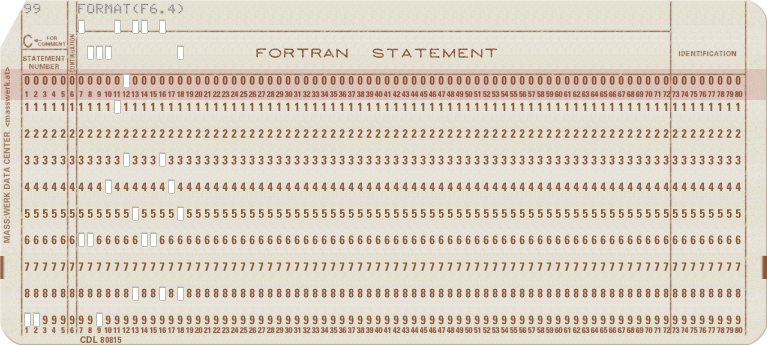
FORTRAN 77 only recognizes upper case letters and a few standard symbols. For example, here’s a simple program that prints the text HELLO WORLD, but splits the PRINT instruction across two lines. This is a really awkward way to write this program, since the lines are so short they don’t need to be split, but it shows how to use continuation lines:
      PROGRAM HELLO
C PRINT A MESSAGE
      PRINT *,
     +'HELLO WORLD'
      END
Save this as hello.f and compile it using a FORTRAN 77 compiler such as GNU Fortran on Linux or Open Watcom FORTRAN on FreeDOS. To install GNU Fortran, install the gcc-gfortran package. Compile the program like this:
$ gfortran -std=legacy -o hello hello.fThe -std=legacy command line option tells GNU Fortran to use the old-style FORTRAN syntax, which is what you need to compile FORTRAN 77 programs. This should give you a program called hello that you can run to print the text:
$ ./hello
 HELLO WORLD
2. DO loops have a specific syntax
One feature I actually really like in FORTRAN is the DO loop. To me, it’s somewhat reminiscent of the for loop in BASIC, but with a tidy syntax. To create a loop across a range of values, specify the start, end, and “step” values, separated by commas. The loop will execute between the DO statement and the line label you indicate as part of the DO statement.
Here’s an example program that counts the numbers from 2 to 10, counting “up” by 2:
      PROGRAM COUNT
      INTEGER I
      DO 10 I = 2, 10, 2
10    PRINT *, I
      END
If you save this as count.f, compile it, and run it, you will see a list of numbers from 2 to 10, even numbers only:
$ gfortran -std=legacy -o count count.f
$ ./count
           2
           4
           6
           8
          10
3. There is no WHILE loop
FORTRAN 77 has very few loop structures. The DO loop is the equivalent of the for loop in other programming languages. One loop feature that’s missing in FORTRAN 77 is a while loop. Instead, you have to “build” it yourself with a GOTO statement.
For example, let’s rewrite the count.f program to use a while-like loop. In this kind of loop, the program starts with a current value, and continues the loop only while a condition is met. In this case, the “end” value should be less than or equal to 10:
      PROGRAM WHILE
      INTEGER I
      I=2
20    PRINT *, I
      I=I+2
      IF (I.LE.10) GOTO 20
      END
This has a few extra lines in it, but it otherwise does the same thing as the count.f program. Note that it starts the I variable with the value 2. Then the program prints the new value and increments I by 2. If the I variable is less than or equal to (.LE.) 2, then the program jumps back to line label 20, which prints the value. And so on until the program prints 10, then I is incremented to 12, which no longer meets the IF condition, so the program ends.
Save this program as while.f and compile it to see the list of numbers from 2 to 10, even numbers only:
$ gfortran -std=legacy -o while while.f
$ ./while
           2
           4
           6
           8
          10
4. DOUBLE PRECISION values are handy
FORTRAN has the expected variable types like integers, floating point values, characters, and strings. These are useful in many kinds of programs. But as a physics student, we used FORTRAN 77 to perform lab analysis, and that required higher precision than REAL, the standard floating point variable type.
Instead, we used DOUBLE PRECISION variables. Since FORTRAN doesn’t treat spaces with any special value, you might also see this variable type written as one word: DOUBLEPRECISION. Double precision variables look like floating point values, in that they have a decimal point, but you need to be careful. The calculation 1.0 / 3.0 to divide 1 by 3 is actually division between two REAL values. To ensure that values are treated as DOUBLE PRECISION, you need to add the D exponent.
For example, for the number 100, you could also hand-write that as “1 x 10^2” or “1 times 10-squared.” Using “engineering” notation, you would type that as 1E2, because the En means “x 10^n”. To make that a DOUBLE PRECISION value, replace E with D.
Here’s a short program that shows the same calculation for one-third, using REAL and DOUBLE PRECISION values:
      PROGRAM THIRD
      REAL A
      DOUBLE PRECISION X
C REAL VARIABLE CALCULATION
      A = 1.0
      A=A/3.0
      PRINT*,A
C DOUBLE PRECISION VARIABLE CALCULATION
      X = 1.0D0
      X=X/3.0D0
      PRINT*,X
      END
Save this as third.f and compile it using GNU Fortran. When you run the program, you’ll first see the one-third calculation as performed with REAL values, then DOUBLE PRECISION values. The results are slightly different:
$ gfortran -std=legacy -o third third.f
$ ./third
  0.333333343
  0.33333333333333331
5. Formatted output with FORMAT
Using the * in the PRINT statement indicates that the program should print values using a “default” format. That means REAL and DOUBLE PRECISION values will be printed using whatever number of decimal places the compiler chooses.
If you want more control over how your values are printed, use the FORMAT statement. This is a special line in a FORTRAN program that doesn’t actually do anything, but is referenced as the format that the PRINT statement should use to print values.
Here’s the same one-third program, adding a FORMAT statement. Note that FORMAT statements can go anywhere in a program where you can otherwise use a program statement, but most programmers put them towards the end of a program:
      PROGRAM THIRD
      REAL A
      DOUBLEPRECISION X
C REAL VARIABLE CALCULATION
      A = 1.0
      A=A/3.0
      PRINT 99,A
C DOUBLEPRECISION VARIABLE CALCULATION
      X = 1.0D0
      X=X/3.0D0
      PRINT 99,X
99    FORMAT(F6.4)
      END
The F6.4 format specification says that this is a floating point value that is 6 characters wide, with 4 digits after the decimal place. That means one-third should be printed as 0.3333 because that’s 6 digits, with 4 digits after the decimal.
Save this new program as thirdf.f and compile it to see the numbers printed using a formatted output:
$ gfortran -std=legacy -o thirdf thirdf.f
$ ./thirdf
0.3333
0.3333
FORTRAN 77 is an old programming language, but it can solve a lot of interesting math programs in a way that might be difficult in other programming languages. After all, the name literally means “formula translation.”
And while there are more recent versions of the Fortran language, “retro programming” means that FORTRAN 77 has become popular again. Maybe it’s time you tried writing your first FORTRAN 77 program.
To learn more about the FORTRAN 77 programming language, check out Oracle’s complete FORTRAN 77 programming reference.

 Don Watkins