Don Watkins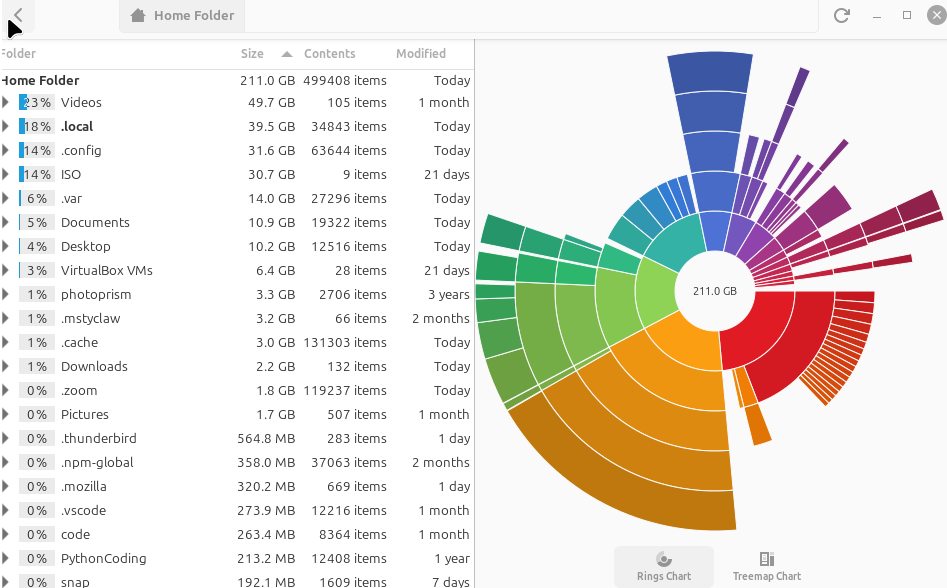
Screen Picture by Don Watkinns CC-by-SA 4.0
Earlier this week, I received a phone call from a gentleman whom I helped transition to Linux Mint last fall. He had a Dell laptop with an i5 processor, eight gigabytes of RAM, and a 900-gigabyte hard drive. Initially, it came with Windows 10, but he was no longer receiving updates because it had reached its end of life. His internet provider had informed him that the laptop had a virus and was insecure. This gentleman is in his early eighties and was not keen on purchasing a new computer. I asked if he would be willing to consider a different approach and, with my help, try a new operating system powered by the Linux kernel. Although he was a bit hesitant, he ultimately agreed to follow my suggestion. I took his laptop and quickly installed Linux Mint Cinnamon. The next day, I met him at a nearby public library to spend some time introducing him to his refurbished computer.
He took it home and started using it, and in a short period of time learned what many of us take for granted: that Linux is a much better option than Windows 11. This week, however, he was concerned that all the updates that he has been receiving could fill up his hard drive, and he had taken to only approving those updates that he thought he needed, like updates to Firefox and Chrome. He noticed that he had a backlog of unapplied updates, and that is why he called me. I spent some time listening to his apprehensions, and then I suggested that he let all the updates occur. I explained the importance of having an up-to-date and secure computer. I told him that I would be happy to meet him at the library anytime to examine his computer and keep it in good running order. I sent him an email with some suggestions that he could easily implement to keep his system up to date without overwhelming his storage.
One of my first suggestions was to use autoremove, which removes packages and dependencies no longer required on your system. On Debian and Ubuntu-based systems, it automatically sweeps away older, inactive kernel versions while keeping your current one and a fallback copy.
$ sudo apt autoremoveI also suggested using $ sudo apt clean which clears out the local cache of downloaded package files (.deb installers) stored on your hard drive.
The commands for RPM-based systems are similar.
$ sudo dnf autoremoveRemoves packages that were automatically installed as dependencies for other applications but are no longer needed, just like on an Ubuntu-based system. Can you issue similar commands on rpm based distributions? Yes, you can!
$ sudo dnf clean allDeletes all cached package data, downloaded .rpm installers, and temporary repository metadata.
Keep your Linux system up to date using the update command:
$ sudo apt updateYou can remove unnecessary files and system logs using the following command:
$ sudo journalctl --vacuum-time=7dThis deletes system logs older than seven days and can free up considerable disk space. This prevents the system logger from quietly consuming gigabytes of disk space over time.
$ sudo journalctl --vacuum-size=500MThis command limits the total size of your system logs to five hundred megabytes, or to a different size of your choice. I also suggested to my friend that his Linux Mint system had a graphical tool, Disk Usage Analyzer, which provides a great visual of your Linux file system, which might point to areas of concern. You can access that by clicking the Linux Mint application menu, going to Administration, and selecting Disk Usage Analyzer. Your Linux system will have a similar graphical tool.
You can also check the size of your file system using command-line tools. One of them is ncdu. Install ncdu with the following command sequence:
$ sudo apt install ncdu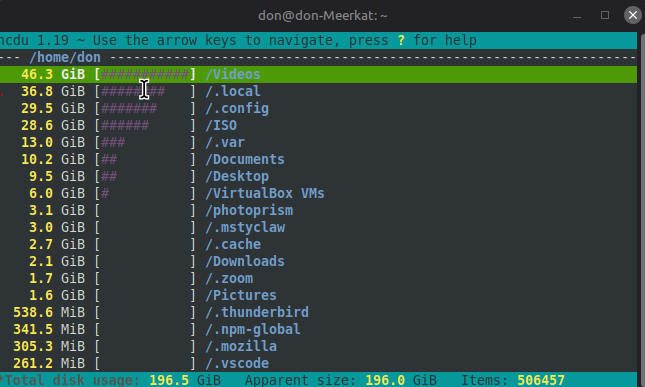
In conclusion, keeping a Linux system up to date is crucial for maintaining security and optimal performance. Through careful management of updates and regular maintenance, even users who may feel intimidated by technology can confidently navigate their systems. By using tools like autoremove, package cleanup commands, and graphical utilities such as Disk Usage Analyzer, users can easily monitor their storage and keep their system efficient. With a little guidance, transitioning to Linux can lead to a more secure and user-friendly computing experience, empowering even those who are less tech-savvy. Regularly updating and managing your system can help you enjoy all the benefits Linux has to offer without the fear of overwhelming your hard drive.

 David Both