Skip to content

Both.org

News, Opinion, Tutorials, and Community for Linux Users and SysAdmins

Primary Menu
  • About Us
  • Computers 101
    • Hardware 101
    • Operating Systems 101
  • End of 10 Events
    • Wake Forest, NC, — 2025-09-20
  • Linux
    • Why I use Linux
    • The real reason we use Linux
  • My Linux Books
    • systemd for Linux SysAdmins
    • Using and Administering Linux – Zero to SysAdmin: 2nd Edition
    • The Linux Philosophy for SysAdmins
    • Linux for Small Business Owners
    • Errata
      • Errata for The Linux Philosophy for SysAdmins
      • Errata for Using and Administering Linux — 1st Edition
      • Errata for Using and Administering Linux — 2nd Edition
  • Open Source Resources
    • What is Open Source?
    • What is Linux?
    • What is Open Source Software?
    • The Open Source Way
  • Write for us
    • Submission and Style guide
    • Advertising statement
  • Downloads
  • Home
  • Upscayl: From Blurry to Beautiful with Free AI Magic
  • Graphics
  • Open Source Software

Upscayl: From Blurry to Beautiful with Free AI Magic

Don Watkins December 18, 2023 3 minutes read
design_photo_art_polaroids

I’ve been interested in photography ever since I co-opted my father’s Kodak 620 camera as a young boy. I used it to take pictures of the flora and fauna of our neighborhood. My love of photography led me to an Instamatic camera in high school, and eventually to digital cameras as they entered the marketplace in the late 1990s. Early digital cameras provided portability and the ability to quickly capture and easily share images on the internet. But they lacked the quality and complexity of the best of film photography. Of course digital cameras have improved a lot since then. But I have years of digital photographs that just look a little, well, little on modern devices.

Until recently, my go-to tool for upscaling digital images has been GIMP. A couple of years ago, I tried to use GIMP to upscale a thumbnail image of my father that was taken in the mid-1940s. It worked, but the photo lacked the detail, depth, and clarity that I wanted.

That’s all changed since I learned about Upscayl, a free and open source program that uses open source artificial intelligence to upscale low-resolution images.

Upscayl

Upscayl works on Linux, Windows, and macOS. It’s easy to install on Linux whether your system uses RPM or DEB packages, and its website contains a universal Linux AppImage too. For macOS and Windows, you can download installers from the project’s website. Upscayl is released with an AGPL license.

Get started with Upscayl

Once installed, you can begin upscaling your images. The GUI software is very easy to use. The software makes your old images look like they were taken yesterday with image resolutions that far exceed the originals. In addition, you can batch scale entire folders and photo albums of images and upscale them all at once.
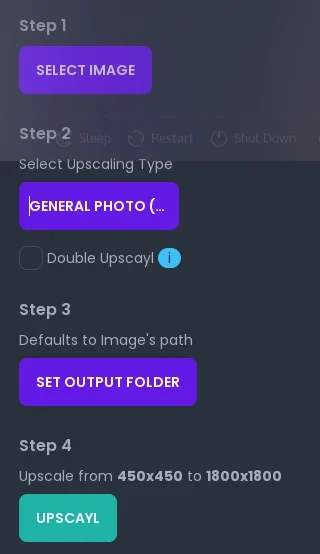
(Don Watkins, CC BY-SA 4.0)

Launch the software and click the Select Image button. Find the image or folder of images you want to upscale. Once the image is loaded, select the type of upscaling you want to try. The default is Real-ESRGAN, and that’s a good place to start. There are six options to choose from, including a selection for digital art.

  • General photo with Real-ESRGAN
  • General photo with remacri
  • General photo with ultramix balanced
  • General photo with ultrasharp
  • Digital Art
  • Sharpen Image

Next, select the output directory where you want your upscaled images to be saved. And finally, click the Upscayl button to begin the upscaling process. The speed of conversion depends on your GPU and the image output choice you make.

Here’s a test image, with the low-resolution image on the left and the Upscayl version on the right:
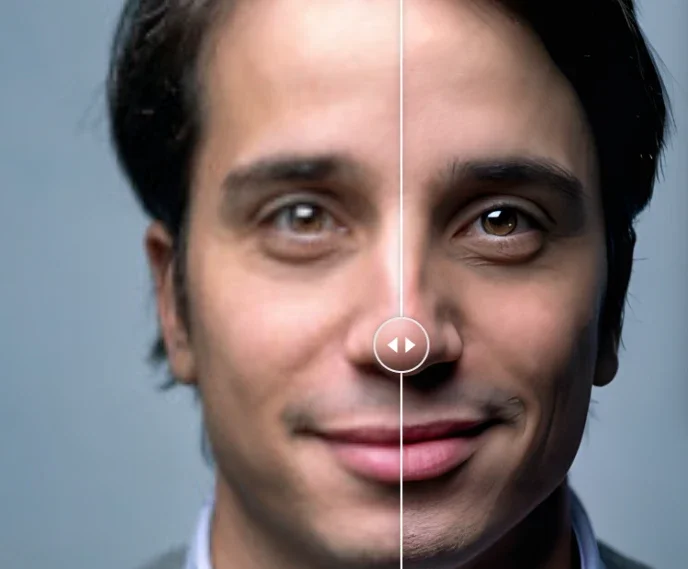
(Derived from Jurica Koletić, Unsplash License)

Time to try Upscayl for your images

Upscayl is one of my favorite upscaling applications. It does depend heavily on your GPU, so it may not work on an old computer or one with an especially weak graphics card. But there’s no harm in giving it a try. So download it and try it. I think you’ll be impressed with the results.
Tags: AI Multimedia Upscayl

Post navigation

Previous: Converting to solid-state disks (SSDs) on the desktop
Next: Host your own apps with Yunohost

Related Stories

puzzle_computer_solve_fix_tool
  • FOSS
  • Linux
  • Moving to Linux
  • Open Source Software

Reasons for Moving to Linux

David Both February 2, 2026
DippingToes_0
  • Getting Started
  • Linux 101
  • Moving to Linux
  • Open Source Software
  • Philosophy

Begin the Journey: Finding a practical starting point with Free Open Source Software

Denny Henke August 13, 2025
myopensourcestory
  • Linux
  • Open Source Software
  • Opinion
  • Philosophy

Begin the journey: Why your ethics might require adoption of Free and Open Source Software

Denny Henke August 8, 2025

Random Quote

Beauty is more important in computing than anywhere else in technology because software is so complicated. Beauty is the ultimate defense against complexity.

— David Gelernter

Why I’ve Never Used Windows

On February 12 I gave a presentation at the Triangle Linux Users Group (TriLUG) about why I use Linux and why I’ve never used Windows.

Here’s the link to the video: https://www.youtube.com/live/uCK_haOXPFM 

Why there’s no such thing as AI

Last October at All Things Open (ATO) I was interviewed by Jason Hibbits of We Love Open Source. It’s posted in the article “Why today’s AI isn’t intelligent (yet)“.

Technically We Write — Our Partner Site

Our partner site, Technically We Write, has published a number of articles from several contributors to Both.org. Check them out.

Technically We Write is a community of technical writers, technical editors, copyeditors, web content writers, and all other roles in technical communication.

Subscribe to Both.org

To comment on articles, you must have an account.

Send your desired user ID, first and last name, and an email address for login (this must be the same email address used to register) to subscribe@both.org with “Subscribe” as the subject line.

You’ll receive a confirmation of your subscription with your initial password as soon as we are able to process it.

Administration

  • Log in
  • Entries feed
  • Comments feed
  • WordPress.org

License and AI Statements

Both.org aims to publish everything under a Creative Commons Attribution ShareAlike license. Some items may be published under a different license. You are responsible to verify permissions before reusing content from this website.

The opinions expressed are those of the individual authors, not Both.org.

You may not use this content to train AI.


Advertising Statement

Both.org does not sell advertising on this website.


Advertising may keep most websites running—but at Both.org, we’re committed to keeping our corner of the web ad-free. Both.org does not sell advertising on the website. Nor do we offer sponsored articles at this time. We’ll update this page if our position on sponsorships changes.

We want to be open about how the website is funded. Both.org is supported entirely by David Both and a few other dedicated individuals.


Copyright © All rights reserved. | MoreNews by AF themes.