A look back: FreeDOS Alpha 5
 Jim Hall
In 1994, several of us got together around a neat idea: Let’s create our own version of DOS, and give away the source code. That became the FreeDOS Project, which just reached it’s 32-year anniversary.
To celebrate the FreeDOS anniversary, I shared some early releases of the FreeDOS distribution, available from the FreeDOS Files Archive at Ibiblio. Download the FreeDOS Alpha5 and FreeDOS Beta1 if you’d like to see where it all started.
A step back in time
Let’s explore the FreeDOS Alpha5 distribution, released in December 1997. Back then, FreeDOS was actually known as “Free-DOS” (with a hyphen). This is due to some history: when I first announced the project in 1994, I called it “PD-DOS” because I assumed giving away the source code was the same as public domain. But others pointed out that because we used the GNU General Public License, the project was actually Free software, so I quickly renamed it “Free-DOS” after a few weeks. We dropped the hyphen several years later, around the time that Pat Villani published his book, The FreeDOS Kernel in 1996. To avoid confusing the FreeDOS Project name as we spell it now, I’ll refer to this distribution simply as “Alpha5.”
As you might guess from the “alpha” name, the Alpha5 distribution was incomplete. It was really a collection of tools, although it did include a very early version of Pat Villani’s FreeDOS Kernel (named “DOS-C” because most of it had been written in the C programming language).
Most significantly, this early release didn’t reproduce all of the “classic DOS” commands. Some of the commands we included in Alpha5 were workalike to classic DOS, but with different usage or (sometimes) different program names. For example, Alpha5 included commands like Assign, Attrib, Chkdsk, Comp, Deltree, Format, Fdisk, Find, Label, Mode, More, Move, Sort, Subst, Tree, and Verify but was missing others like Append, Choice, Edit, Edlin, Help, and Print. Some commands were actually extensions to classic DOS commands including Bwbasic (a BASIC programming environment), Clsx (like Cls, but with colors), and Fdformat (a future replacement for Format). Interestingly, the FreeDOS Command shell (version 0.60) didn’t include many internal commands; Command provided CD and Dir to navigate the system, but other commands like Cls, Copy, Del, Mkdir, Rmdir, Pause, Date, Time, and Type were external programs.
The Alpha5 distribution also included a few other useful utilities, like FD (FreeDOS Diagnostics, to provide basic system information), FFF (Fast File Find, to locate files on the hard disk), Fin (FreeDOS file information, to display details about files), Fips (a program to split disk partitions), PG (a file viewer), and Spool (a background print spooler, very handy for dot matrix printers). We also provided several command line tools that modern Linux users may recognize, including Man (a replacement for Help, based on the Unix man command), Nro (similar to nroff), Tee, Touch, Unix2dos, Unzip, and Zip.
But despite its incomplete nature, this early FreeDOS version showed a lot of promise.
Installing Alpha5
We provided the Alpha5 distribution as a collection of six zip files, which you extracted to six floppy disks: Base-1, Drivers-1, Editors-1, Lang-1, Source-1, and Source-2. Only Base and Drivers were required; the others were optional. Alpha5 did not provide a boot floppy. Instead, you had to start with a minimal DOS environment on your system.
The installer was a simple program that I based off the SLS Linux installer. This scrolled from the bottom of the screen, and provided simple prompts. First, you selected which disk sets you wanted to install and where you wanted to install FreeDOS, then the installer prompted you to insert each floppy into the drive before it unzipped each package to the hard drive.
Let’s look at the installation process for the Alpha5 distribution. In this session where I install from A: and install to C:\DOS, I’ve answered y to install the editors and programming languages, but n to not install the source code:
-- Free-DOS Install --
----------------------------------------------------------------------

STOP!  READ THIS!
=================

If you downloaded the FreeDOS Distribution in separate zip files,
first make sure that you unzipped the files onto separate floppies
before you run this Install program.  YOU CANNOT USE THE ZIP FILES AS
PROVIDED ON MANY FREEDOS DISTRIBUTION SITES.

Also, please run the Install program from a directory on your hard
disk, and not from a boot floppy, at least in version 1.x.  Otherwise,
the Install program will not be able to find the UNZIP program that it
needs to extract the distribution packages.  (This will be fixed in
version 2.0).

----------------------------------------------------------------------

Copyright (C) 1997, James Hall <jhall1@isd.net>
This is free software.  See the file COPYING for details.

Install from what path? A:
Install files to what path? C:\DOS


You are about to install these disk series:
BASE DRIVERS EDITORS GAMES LANG SOURCE APPS

The install program will now let you install these disk series.  With
each series, you will be able to choose which to install and which to
skip.  Each disk series consists of several package files.  You can
also select which individual packages to install and which to skip.
Note that some disk series and package files may already be selected
for you.

Press y to continue, or q to quit: y

BASE: Basic files for the Free-DOS distributions.  Includes Tim
BASE: Norman's COMMAND.COM, and Pat Villani's Free-DOS Kernel.  You
BASE: will want to install this series.
BASE [REQUIRED]


DRIVERS: Device drivers for Free-DOS.  This includes ANSI.SYS and
DRIVERS: other SYS files.
DRIVERS [REQUIRED]


EDITORS: Editors that are associated with the Free-DOS Project, such
EDITORS: as Freemacs 1.6d.
EDITORS [OPTIONAL]
Install series EDITORS? [yn] y

GAMES: Games that run under Free-DOS.  DOOM runs under the current
GAMES: Free-DOS kernel.
GAMES [SKIPPED]


LANG: Compilers and other languages.  This includes the Micro-C
LANG: compiler, Arrow Assembler, VAL linker, and the Bywater BASIC
LANG: environment.
LANG [OPTIONAL]
Install series LANG? [yn] y

SOURCE: Source to all the Free-DOS programs.  This can get pretty
SOURCE: large, so you should not install it unless you plan to
SOURCE: contribute to the Free-DOS project.
SOURCE [OPTIONAL]
Install series SOURCE? [yn] n

APPS: Applications for Free-DOS, but not editors.  Some application
APPS: packages may include shareware.
APPS [SKIPPED]


Installing the software ...


>> Installing series BASE <<

installing 'BASE-1'
…and so on for the rest of the installation.
You may have noticed that the installer advertised that it would also install the Apps and Games disk sets. We didn’t actually provide these disk sets in Alpha5. I left these entries as “placeholders” for a future distribution that might include these; they were skipped during the installation.
Exploring Alpha5
After installing Alpha5, you had to create your own CONFIG.SYS to load the new Command shell. Since I installed to C:\DOS, I created this CONFIG.SYS file:
SHELL=C:\DOS\BIN\COMMAND.COMOn more modern versions of FreeDOS, you would usually add /P to the end of the line, to make the shell a permanent shell. However, this early implementation did not support the /P command line option. Note that if you type the Exit command, the shell will exit and you will need to type the full path to the shell to go back to the command line.
After making this change, I rebooted my virtual machine and was greeted with this welcome message before my first DOS prompt:
License:
 This program is free software; you can redistribute it and/or modify
 it under the terms of the GNU General Public License as published by
 the Free Software Foundation; either version 2 of the License, or
 (at your option) any later version.

 This program is distributed in the hope that it will be useful,
 but WITHOUT ANY WARRANTY; without even the implied warranty of
 MERCHANTABILITY or FITNESS FOR A PARTICULAR PURPOSE.  See the
 GNU General Public License for more details.

 You should have received a copy of the GNU General Public License
 along with this program; if not, write to the Free Software
 Foundation, Inc., 675 Mass Ave, Cambridge, MA 02139, USA.

FreeDOS Command Line Interface version 0.60

developed by: Tim Norman
              Matt Rains
              Evan Jeffrey
              Steffen Kaiser
              Oliver Mueller
C:\>
Interestingly, this early shell didn’t read from AUTOEXEC.BAT at startup. Every time you boot the system, you would also need to set the PATH variable so the shell could find common external commands like Type or More.
C:\>set PATH=C:\DOS\BINFile organization
The Alpha5 distribution had a fairly simple directory tree, which you can view with the tree command. This displays each directory and subdirectory using graphical line-drawing characters, making it easy to see how your files are organized:
C:\>tree dos

Directory PATH listing for Volume ALPHA5
C:.
├───BIN
├───HELP
├───DOC
│   ├───COMMAND
│   ├───FREEDOS
│   ├───EMACS16D
│   ├───TERSE
│   ├───MC314
│   └───VAL
├───EMACS
├───TERSE
└───CC
From the beginning, we used a directory structure inspired by Unix, with some variations. Note that binaries (EXE, COM, and SYS programs) are in the bin directory, Help documentation is in the help directory, and other program documentation in the doc directory. We also installed Freemacs (an editor similar to GNU Emacs) in the emacs directory, Terse (a much simpler editor) in the terse directory, and the Micro-C compiler, Val linker, and other compiler tools in the cc directory.
Finding files
Most of the other DOS commands work as you’d expect, but let’s look at a few of the extensions. One handy utility was Fast File Find to find lost files. Let’s say you know there’s a file somewhere on your system called Val, but you don’t know where it’s located. Just type fff plus the filename, and the program will scan your hard disk and print all possible matches.
In this case, Val is the name of a linker program, used when compiling programs. If you installed the Lang disk set, Alpha5 installs Val in the \DOS\CC directory, plus a help file in the \DOS\HELP directory and documentation in the \DOS\DOC directory:
C:\>fff val

Fast File Find: val
C:\DOS\HELP
VAL.HLP

C:\DOS\DOC\VAL
VAL.DOC

C:\DOS\CC
VAL.EXE

3 files found.
Editing with Terse
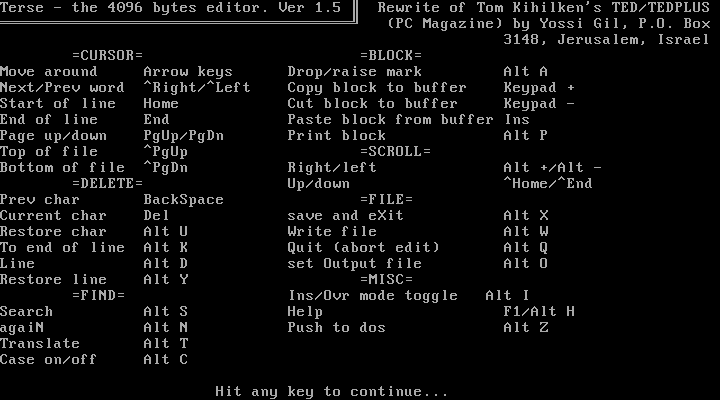
The Terse editor was a rewrite of the TED editor, and was fairly easy to use. It presented a rather plain user interface, and used Alt key combinations for various commands, like Alt-q to quit or Alt-x to save and exit. Start the editor with the t command:
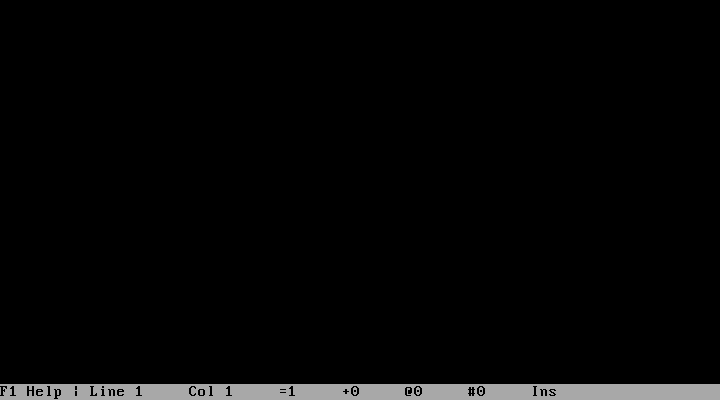
If you needed help using the editor, Terse kept a “Press F1 for help” prompt in the lower left corner of the screen. Tapping the F1 key displayed a list of possible editor commands.
Viewing files in PG
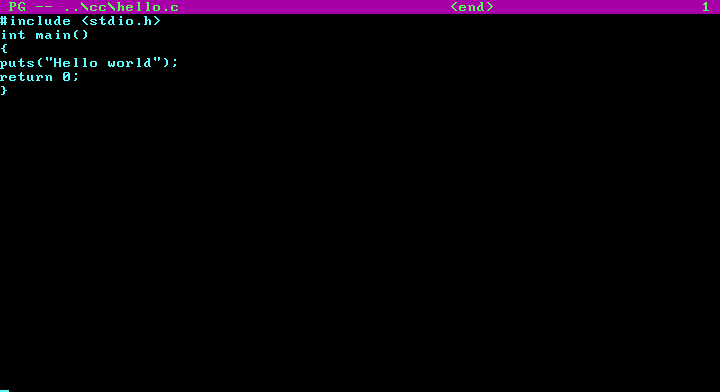
The traditional way to display files in DOS is to use the Type or More commands, but FreeDOS also included the pg program. Short for “Page,” this displayed the contents of a file to the screen and allowed you navigate backwards and forwards in the file.
Try the FreeDOS Alpha5 distribution
There’s more to explore in the Alpha5 distribution. Install it on your own and take a step back in time to the early days of FreeDOS. As you use the system, keep in mind that this was very much an alpha release, so things will not work the way you expect them to, and many tools may have bugs.
One thing to know is that the dir command displays files in a way you will find very unfamiliar. Files and directories were displayed in a sorted list, but with attributes on the left and the file size on the right:
C:\DOS\BIN>dir

d-  .                      <dir>
d-  ..                     <dir>
--  ASSIGN.COM             12280
--  ATTRIB.COM              3880
--  SYS.EXE                12160
--  BITDISK.EXE            10311
--  RESTORRB.EXE           13398
--  BIN2C.EXE              14040
--  RUNDOWN.EXE              615
--  EXE2BIN.EXE            22472
--  BUFFERP.COM             2190
--  DB.COM                 12702
--  FDXMS.SYS               2240
--  TDMOUNT.BTM             4047
--  BOOT.BIN                 512
--  BOOT1440.BIN             512
--  BOOT360.BIN              512
--  BOOT720.BIN              512
--  IPL.SYS               115104
--  C_LOCK.COM              3834
[press any key to continue]
With these caveats, it’s interesting to explore the Alpha5 distribution. Check it out to see what you can do, and to see where it all started.