Old-school programming with BW BASIC
 Jim Hall
In the early days of personal computing—from the late 1970s and through the 1980s—many people got their start with BASIC programming. BASIC was a universal programming language that came built into most personal computers, from Apple to IBM PCs.
When we started the FreeDOS Project in June 1994, it seemed natural that we should include an open source BASIC environment. I was excited to discover one already existed in Bywater BASIC.
Bywater BASIC implements a large superset of the ANSI Standard for Minimal BASIC (X3.60-1978) and a significant subset of the ANSI Standard for Full BASIC (X3.113-1987). It’s also distributed under the GNU General Public License version 2, which means it’s open source software. We only want to include open source programs in FreeDOS, so Bywater BASIC was a great addition to FreeDOS in our early days.
We’ve included Bywater BASIC since at least FreeDOS Alpha 5, in 1997. You can find Bywater BASIC in FreeDOS 1.4 in the “Development” package group on the Bonus CD:
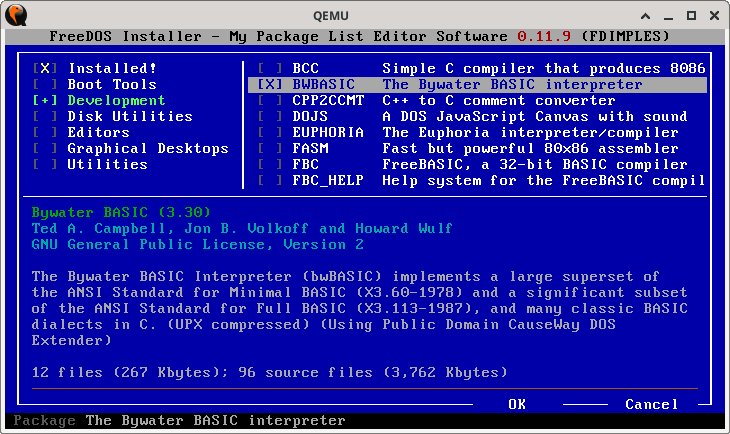
FreeDOS installs the Bywater BASIC package in the \DEVEL\BWBASIC directory. Change to this directory with CD \DEVEL\BWBASIC and type BWBASIC to run the Bywater BASIC interpreter.
C:\DEVEL\BWBASIC>bwbasic
########  ##    ## ##      ##    ###    ######## ######## ########
##     ##  ##  ##  ##  ##  ##   ## ##      ##    ##       ##     ##
##     ##   ####   ##  ##  ##  ##   ##     ##    ##       ##     ##
########     ##    ##  ##  ## ##     ##    ##    ######   ########
##     ##    ##    ##  ##  ## #########    ##    ##       ##   ##
##     ##    ##    ##  ##  ## ##     ##    ##    ##       ##    ##
########     ##     ###  ###  ##     ##    ##    ######## ##     ##


                                    ########     ###     ######  ####  ######
                                    ##     ##   ## ##   ##    ##  ##  ##    ##
                                    ##     ##  ##   ##  ##        ##  ##
                                    ########  ##     ##  ######   ##  ##
                                    ##     ## #########       ##  ##  ##
                                    ##     ## ##     ## ##    ##  ##  ##    ##
                                    ########  ##     ##  ######  ####  ######


Bywater BASIC Interpreter, version 3.30
Copyright (c) 1993, Ted A. Campbell
Copyright (c) 1995-1997  , Jon B. Volkoff
Copyright (c) 2014-2017  , Howard Wulf, AF5NE
Copyright (c) 2019       , Ken Martin


bwBASIC:
Writing a sample program
Let me demonstrate Bywater BASIC by writing a test program. We’ll keep this simple—print five random numbers. This requires only a few constructs—a loop to iterate over five values and a random number generator. BASIC uses the RND(1) statement to generate a random value between 0 and 1. We can use PRINT to display the random number.
One feature I like in Bywater BASIC is the integrated “help” system. There’s nothing more frustrating than forgetting the syntax for a BASIC statement. For example, I always forget how to create BASIC loops. Do I use FOR I IN 1 TO 10 or FOR I = 1 TO 10? Just type help FOR at the Bywater BASIC prompt and the interpreter displays the usage and a brief description.
bwBASIC: 10 randomize
bwBASIC: help FOR
------------------------------------------------------------
     SYNTAX: FOR variable = start TO finish [STEP
             increment]
DESCRIPTION: Top of a FOR - NEXT structure.  The loop will
             continue a fixed number of times, which is
             determined by the values of start, finish,
             and increment.
bwBASIC: 20 for i = 1 to 5
bwBASIC: 30 print RND(1)
bwBASIC: 40 next
Another neat feature in Bywater BASIC is how it reformats your BASIC instructions, so they are easier to read. After typing my brief program, I can type list to see the full source listing. Bywater BASIC automatically adds the CALL keyword to my RANDOMIZE statement on line 10 and indents the PRINT statement inside my loop. These small changes help me to see loops and other features in my program, which can aid in debugging.
bwBASIC: list
   10 CALL randomize
   20 for i = 1 to 5
   30   print RND(1)
   40 next
If everything looks okay, then type RUN to execute the program. Because I used the RANDOMIZE statement at the start of my BASIC program, Bywater seeds the random number generator with a random starting point. This ensures that my numbers are actually random values and don’t repeat when I re-run my program.
bwBASIC: run
 .939512
 .769341
 .120029
 .959471
 .315683
bwBASIC: run
 .994964
 .85168
 .13538
 .397748
 .679128
bwBASIC: run
 5.04166E-2
 .934019
 .150731
 .836055
 4.25428E-2
When you’re done with Bywater BASIC, you can exit back to the operating system with the QUIT command.
Install Bywater BASIC on your FreeDOS system and start experimenting with BASIC programming. BASIC can be a great first programming language, especially if you are interested in getting back to the “roots” of personal computing. You can find more information about Bywater BASIC in the manual, installed in the \DEVEL\BWBASIC directory as BWBASIC.DOC. You can also explore the online “help” system by typing HELP at the Bywater BASIC prompt.